HubSpot CRM Index Page Updates
HubSpot's CRM index page just got its biggest update in years — and every portal will be migrated by end of July 2026 whether you're ready or not. Here's what's changing, what's new, and how to get ahead of it.
HubSpot CRM Index Page Updates: What's New in 2026
If you've ever lost a minute (or five) hunting through HubSpot's CRM navigation just to find a contact or drag a deal to the next stage, you're going to like what just dropped.
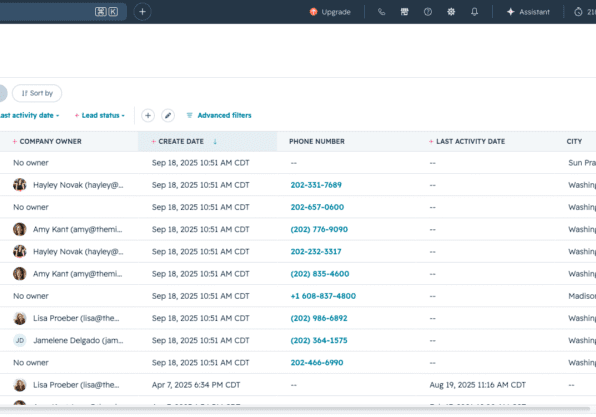
HubSpot is rolling out a significant update to its CRM index page — the central hub where you work with Contacts, Companies, Deals, Tickets, and other objects — and the changes go deeper than a fresh coat of paint. We're talking a cleaner layout, a smarter toolbar, an improved board view, and entirely new ways to visualize your data.
Here's what's new in the HubSpot CRM updates for 2026, why it matters, and what you need to know before the deadline.

What changed in the HubSpot CRM table view
The table view is where most people spend the bulk of their time in HubSpot CRM navigation, and these updates are focused on cutting friction:
- Pinned view tabs got a redesign, so switching between your saved CRM views is faster and easier to scan. The toolbar has been streamlined to surface the controls you actually use — pipelines, search, filter, sort, and visualizations. Less hunting, fewer clicks.
- Drag-and-drop column reordering is smoother now, and there's a keyboard shortcut to jump straight into the column editor: CMD+SHIFT+L. Small detail, real time-saver.
What changed in the HubSpot board view
The HubSpot board view got both a visual refresh and some meaningful new functionality.
Drag-and-drop performance is improved — if you've ever had a deal card lag, snap to the wrong stage, or just plain not cooperate, this update addresses that directly.
New lane-level controls let you set custom colors for pipeline stages, jump directly to stage settings, add records to a specific stage, and create pipeline stage automations right from the board. That last one is significant. Building automation directly from the stage where you need it — instead of navigating to the workflow tool — is a real workflow improvement for anyone managing complex pipelines.
WATCH: Walk-thru of the new HubSpot Index Board View
Brand new: Gantt views, report views, and conditional highlighting
This is where the update gets genuinely interesting. Beyond the table and board, you can now visualize your CRM data in ways that weren't possible before:
- Report view — see your deals or contacts rendered as a report, right from the index page
- Gantt view — ideal for task-heavy workflows where timeline matters
- Conditional highlighting — surface what matters most at a glance, without building a separate dashboard
These aren't niche features. For ops-minded teams who live in HubSpot every day, this is a meaningful upgrade to how you can monitor and act on your data.
Who gets these updates — and when do you have to switch?
All HubSpot hubs and tiers. But here's the part worth flagging: this isn't optional forever. All portals will be automatically migrated to the new CRM index experience by the end of July 2026.
You can opt in now at your Product Updates page — and we'd recommend doing it on your own timeline rather than waiting for HubSpot to flip the switch. That way your team can get familiar with the new layout before it's the only option.
HubSpot has put together solid resources to help with the transition: an interactive demo, a team prep guide, a 3-minute Academy video, and the full Streamlined Index Resource Center.
Want help preparing your team for the migration?
A cleaner interface only goes so far if your pipeline stages are misconfigured, your views are cluttered with stale records, or your board is reflecting deals that should have been closed out months ago. Getting the most out of these updates means your underlying CRM setup needs to be in good shape first.
If you'd like a second set of eyes on your HubSpot portal before the July migration, request support from our team using this form, and we'll take a look to see if any additional settings require configuration.
Otherwise, you can opt-in your portal at your Product Updates page in HubSpot.
Why this matters beyond the interface
Here's the honest take: a cleaner CRM isn't just a nice-to-have. It's a signal your team will actually use the tool.
One of the most common things we see is avoidance behavior — reps logging calls in a spreadsheet, managers keeping their own deal tracker, marketers guessing at list quality because the database feels too messy to trust. A lot of that starts with friction in HubSpot CRM navigation. When the tool is hard to use, people find workarounds. When it's fast and clear, they use it.
These updates don't fix everything. But they lower the barrier, and that counts.

About Amy Kant
Amy Kant is a Sales Architect at The Middle Six®. She specializes in process mapping and HubSpot data schema architecture. With over 20 years of experience in digital marketing, web development, project management, and communication, she thrives on transforming complex systems into streamlined, scalable solutions that drive business success. Amy uncovers operational efficiencies and optimize business and sales practices. She is passionate about innovation and problem-solving, empowering teams with the right tools and structures to work smarter.
Need some 1:1 attention?
If you’re looking for expert guidance on HubSpot architecture, implementation, or ongoing support, The Middle Six team is here to help. Visit our HubSpot services page to learn more and get started today.