HubSpot Mobile Notetaker: How One Tap Turns Every Meeting Into CRM Data
HubSpot Mobile Notetaker now lets field sales reps record meetings with a single tap, right from their phone's home screen — no CRM record required first. This post breaks down how the feature works, why it matters for busy reps, and what admins need to enable to turn it on.
A Faster Way to Capture Sales Conversations
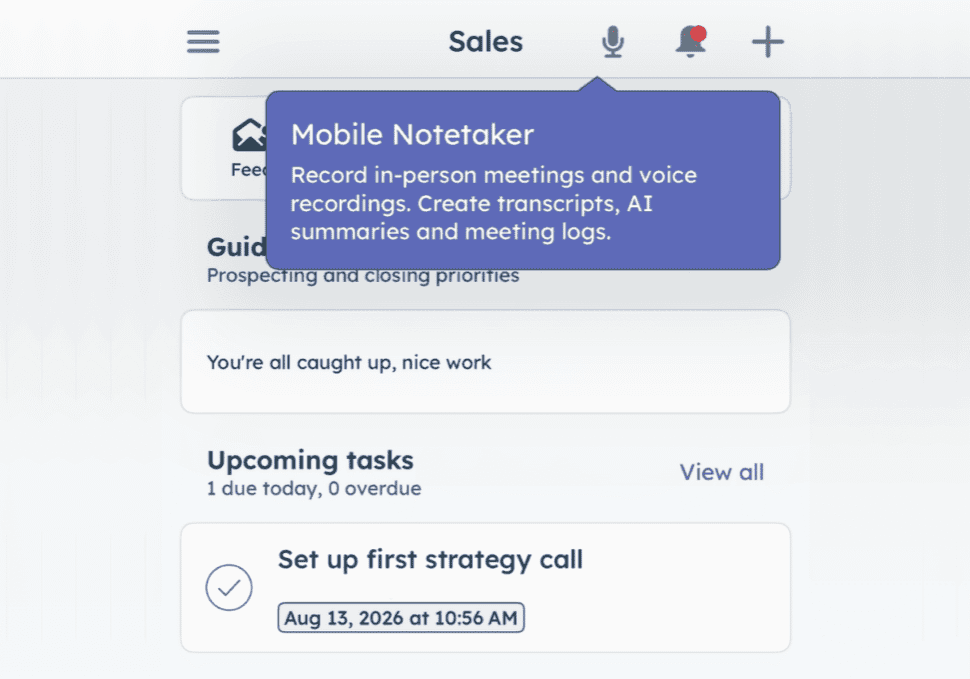
HubSpot Mobile Notetaker just got a lot easier to use in the field. Sales reps can now start recording an in-person meeting — or capture a quick post-meeting voice memo — with a single tap from the HubSpot mobile home screen. There's no searching for a contact, no creating a meeting first in HubSpot, and no typing up hand-written notes after the fact. You capture the conversation, and HubSpot handles the rest.
For reps who live meeting to meeting, that difference matters more than it sounds.
Here's what's new, at a glance:
- No more relying on memory. Hit record, and the conversation is captured.
- Works offline. No service? No problem. Recordings save locally and sync once you're back online.
- Syncs with your calendar. Launch recording straight from a scheduled meeting.
- AI does the writing. Summary, follow-up email, and next steps, generated for you automatically.
- CRM updates, suggested for you. Just review and approve — no manual entry needed.
What Is HubSpot Mobile Notetaker?
HubSpot Mobile Notetaker is the mobile version of HubSpot's AI meeting assistant, built for reps who meet prospects and customers in person rather than over video calls. Its job is simple: get what happened in a meeting into your CRM — the system where your team tracks every contact, company, and deal — without a rep typing any of it in by hand. Instead of requiring a scheduled meeting or an existing record in HubSpot, the tool sits behind a global capture button (the microphone icon at the top of the mobile home screen) that starts recording instantly.
Reps can also record offline. If a meeting happens somewhere without cell service or Wi-Fi, the recording saves locally and waits to be linked to the right contact, company, or deal once the rep is back online.
Why HubSpot Mobile Notetaker Matters for Field Sales Teams
Unplanned meetings are a normal part of field sales — but they've historically come with an admin tax. Before this update, a rep walking into a surprise conversation had to find or create a CRM record, log a meeting activity, and then navigate to the recording feature, all before the conversation even started. Afterward, many reps would pull over in the parking lot to type up notes while details were still fresh.
One-tap HubSpot mobile app call recording removes both of those friction points. Reps capture first and organize later, which means:
- Fewer missed details
- Less manual note-taking
- More time selling, less time on data entry
This is part of HubSpot's broader push toward what it calls "zero admin" for sales reps — reducing the busywork between conversations and CRM updates.
How HubSpot Mobile Notetaker Works
One-Tap Capture From the Home Screen
Tap the microphone icon on the mobile home screen and recording starts immediately, with no CRM pre-work required. A setting (remembered for future sessions) controls whether recordings are automatically saved.
The Mobile Notetaker Page
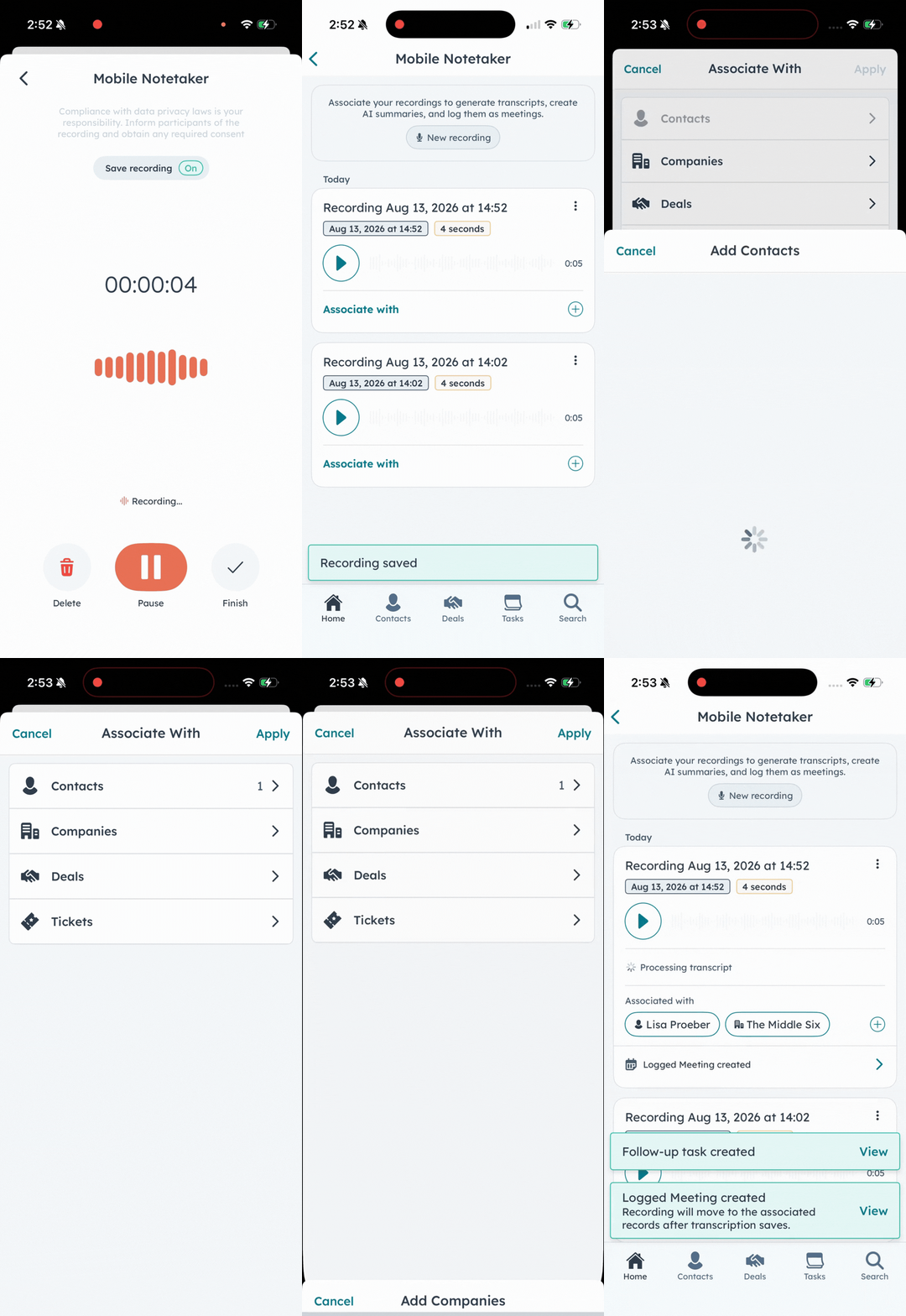
Right after a recording ends, reps land on the new Mobile Notetaker page, where they can:
- Associate the recording with a new or existing logged meeting
- Link it to the relevant contact, company, or deal
- Replay, rename, or delete pending recordings — learn how here
Once a recording is associated with a record, it's automatically cleared from the pending list.
Offline Mode and Deferred Association
Recordings made without a connection are stored locally under Mobile Notetaker until the rep is back online, at which point they can log and associate the meeting as usual.
Scheduled and Logged Meeting Entry Points
Reps who prefer to start from a calendar invite still can — recordings can be launched directly from scheduled meetings or existing logged meeting activities on a record's timeline.
Review, Transcript Replay, and AI-Suggested Actions
Every recorded meeting now includes two new tabs:
- Review: an AI-generated summary, a transcript, and audio playback with adjustable speed — plus a one-tap option to generate a follow-up email pre-filled with the meeting summary.
- Action: AI-suggested next-step tasks (create or dismiss individually) and suggested CRM property updates (accept, edit, or reject before they're applied).
For an admin's-eye view of the underlying in-person meeting notetaker capability this builds on, HubSpot's own documentation on the in-person AI meeting assistant for iOS is a useful reference.
How To Turn On HubSpot Mobile Notetaker: Admin Setup Checklist
This feature relies on a few account-level settings, all configured from HubSpot desktop:
- Settings > Tools > Record & Transcription — enable call recording and call transcription.
- Settings > Account Management > AI — turn on Generative AI, CRM data, and Customer conversation data access.
- Settings > Data Capture — select the Deal object and the specific properties you want the AI to match against for suggested updates.
Because this touches on recording consent and AI processing of conversation data, it's worth looping in whoever owns compliance and data privacy at your organization before rolling it out account-wide.
Getting the Most Out of CRM Automation for Sales Reps
One-tap recording is a small interaction change with an outsized effect on rep behavior: the easier it is to capture a conversation, the more consistently reps actually do it — and the more CRM data you get without asking reps to type it in manually.
If your team is exploring an AI meeting summary for sales reps tool like this one, the setup steps above are just the starting point. Getting the Deal property matching right, deciding which suggested updates to auto-approve versus review, and training reps on the new workflow all make a real difference in adoption.
Ready to roll out HubSpot Mobile Notetaker across your sales team the right way? Talk to our HubSpot implementation team to get your account configured, your reps trained, and your CRM data flowing automatically from every meeting.

About Amy Kant
Amy Kant is a Sales Architect at The Middle Six®. She specializes in process mapping and HubSpot data schema architecture. With over 20 years of experience in digital marketing, web development, project management, and communication, she thrives on transforming complex systems into streamlined, scalable solutions that drive business success. Amy uncovers operational efficiencies and optimize business and sales practices. She is passionate about innovation and problem-solving, empowering teams with the right tools and structures to work smarter.
Need some 1:1 attention?
If you’re looking for expert guidance on HubSpot architecture, implementation, or ongoing support, The Middle Six team is here to help. Visit our HubSpot services page to learn more and get started today.